

How to Purchase Without Creating a PayPal Account
We use the PayPal platform to process orders but the creation of a PayPal account is not required to complete a purchase.
Please follow the step-by-step guide below to purchase without creating a PayPal account:
Step 1: Add to Basket
- Select your desired color and quantity.
- Click ‘Add to basket’.
Step 2: View Basket
- If you would like to add more items to your order, you can do so at this point.
- If not, click ‘View basket’.
Step 3: Review Order
- The screen will show an order summary and an opportunity to make any changes.
- If you alter the order, remember to click ‘Update basket’.
- Click ‘Proceed to checkout’.
Step 4: Enter Billing Details
- Fill out your billing details.
- If you would like your order delivered to a different address, check the box at the top labeled ‘Deliver to a different address’.
- Once all details are filled out, click ‘Proceed to PayPal’.
Step 5: Pay by Debit or Credit Card
- You will be directed to a PayPal webpage asking you to log in.
- Ignore this section and click the white button below labeled ‘Pay by Debit or Credit Card’.
- This starts the process of checking out as a guest. Enter your email and click ‘Continue to Payment’.
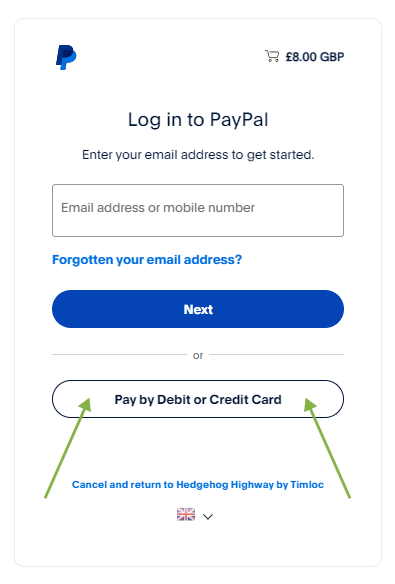
Step 5.2 – Pay by Debit or Credit Card button
Step 6: Complete Payment
- Fill in your payment details.
- Ensure the option ‘Save information & create your PayPal account’ is unticked. This will prevent the creation of a PayPal account after your purchase.
- Click ‘Pay now as guest’.
Completion
Your order is now complete, and you will be directed back to the Hedgehog Highway website with your confirmation.
For any queries, please contact us at: marketing@timloc.co.uk.